
 Getting Started
Playing songs in a playlist
Playlists are created using Media Go. For information on how to create a playlist, refer to the Help of Media Go.
-
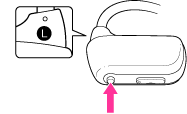
Press and hold the P.LIST (Playlist)/SHUF (Shuffle) button for longer than 1 second to play songs in a playlist.
Press and hold the  /
/ button for longer than 1 second to skip to the beginning of the previous/next playlist.
/ button for longer than 1 second to skip to the beginning of the previous/next playlist.To return to playback of all the songs transferred to your Walkman, press and hold the P.LIST (Playlist)/SHUF (Shuffle) button for longer than 1 second during playback of songs in a playlist.
Note
-
When you play songs in a playlist, only the songs registered in that playlist are played back repeatedly.
