
 Getting Started
Operation flow to transfer music
You can use your Walkman to enjoy music stored on your computer. Transfer music to the Walkman in the following ways.
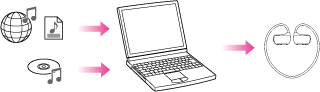
Transferring music using Media Go (Windows only)
You can use Media Go to import music from your CDs, etc., for transfer to your Walkman. If you have already managed music with iTunes, etc., you can use Media Go to transfer music to the Walkman by drag-and-drop.
For details on how to use Media Go, see the following topics.
-
Media Go [Details]
-
Importing music from CDs using Media Go [Details]
-
Transferring music using Media Go [Details]
Transferring music by drag-and-drop using iTunes (Mac only)
You can transfer music stored on your computer to your Walkman by drag-and-drop using iTunes.
For information on how to use iTunes, see the following topics.
-
iTunes (Mac only) [Details]
-
Transferring music by drag-and-drop using iTunes [Details]
Transferring music by drag-and-drop
You can directly transfer music stored on your computer by drag-and-drop.
For information on how to transfer music by drag-and-drop, see [Details].
Hint
-
For detailed information on how to import music, refer to the Help of the individual software.
-
For details about supported file formats, see [Details].
