
 Getting Started
Playing music
To play music, display the [Music Library] screen by selecting  [Music Library] on the Home menu.
[Music Library] on the Home menu.-
From the Home menu, select
[Music Library].

-
Select the desired search method
 desired song.
The music library menu appears.
-
You can select the desired search method to display the music list screen and search for songs [Details].
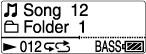
The music playback screen appears and song playback begins.
-
Select items until a song list appears.
-
For details on how to operate the music playback screen, see [Details].
-
When your Walkman turns off from the song playback status, you can start playback of the last song you listened to by pressing the
 button.
Related Topics
