


Charging with a USB AC adaptor
- Connect the USB AC adaptor to the USB microB port on this unit.
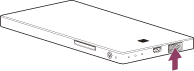
- Connect the USB AC adaptor to a power outlet.
The battery indicator lamp lights up amber, and charging of this unit starts.
When this unit is fully charged, the battery indicator lamp turns off.
When charging is complete, disconnect the USB AC adaptor from the unit and the power outlet.
Approximate charging time: 3.5 hours (approximate value under Sony test conditions when using AC-UD10)
For details on USB AC adaptors confirmed to work with this unit, refer to the following support page:
Note
- Be sure to insert the connector in the correct way. Pushing the connector forcibly into the port may damage the port and result in a malfunction.
- While the unit is connected to the USB AC adaptor, its wireless LAN function can be used, but USB devices cannot be used with it.
- Charge the battery in an ambient temperature of 0 °C - 30 °C (32 °F - 86 °F). For optimum performance of the rechargeable lithium-ion battery, it is recommended to charge between 10 °C – 30 °C (50 °F - 86 °F).
- If an abnormality (e.g. increased unit temperature) occurs while charging, the ACCESS (data access) lamp may blink amber, and charging may stop.