
Portable Wireless ServerWG-C10
Deleting data (Android device)
- Tap
 (Delete) on the file/folder list screen.
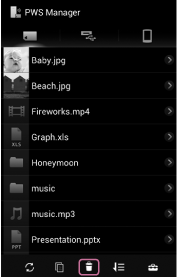
- Tap the file/folder you want to delete.
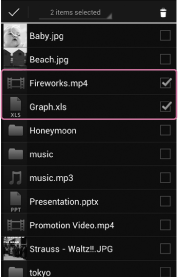
The check mark is displayed to the right of the file or folder.
You can select several files/folders.
To select all displayed files/folders, operate as follows:
(1) Tap the spinner (triangle) to the lower right of the selected item number displayed in the upper part of the screen.
(2) Tap [Select all] from the dropdown list.
- Tap (Delete).
- Tap [OK].
Deletion of the file/folder starts.
When deletion is complete, tap [OK] to return to the file/folder list screen.
Note
- Depending on the communication usage environment, it may take time to process data, or processing may stop before deleting completes.
- If you turn off the unit or remove a memory device while it is being accessed, data in the memory device may be damaged.
- Do not change the connection status, such as connection to a computer, USB AC adaptor, etc., while deleting.
- If you connect the unit to a computer, the wireless LAN connection is cut and deleting stops.
- While the unit is connected to the USB AC adaptor, other USB devices cannot be used.
- Data cannot be deleted from a write-protected memory device. Make sure that the memory device is not write-protected.
 Go to Page Top