
Portable Wireless ServerWG-C10
Changing the device to be accessed (Android device)
- Connect the unit and Android device via wireless LAN and launch "PWS Manager."
- Tap the icon of the device you want to access on the Android device.
A list of folders or files in the tapped device is displayed.
A list of memory cards is displayed when "PWS Manager" is activated.
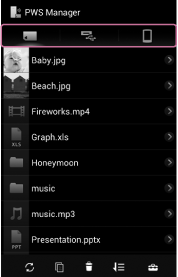
 : Memory card inserted in the unit
  : USB device connected to the unit
  : Memory of the currently-operated Android device(*)
*When
is selected, "sdcard" is displayed for the path name, although an external memory of the Android device such as an SD card, or the Android device’s internal memory, may actually be selected. The selected memory area will depend on the specifications of your Android device.
 Go to Page Top